Our work
Toys
BrickLens
Brick builds in 3D, part by part and step by step
The demo is a recreation of the system, with made-up data: the original belongs to the client and is not published. No sign-up needed.
The context
An online toy store, a kit maker or a collectors' community that sells or documents brick builds. The product page is a photo and a part count, the instructions are a PDF, and the question that comes in most often —which part is missing, in what color and where it goes— gets answered by neither.
What the system does
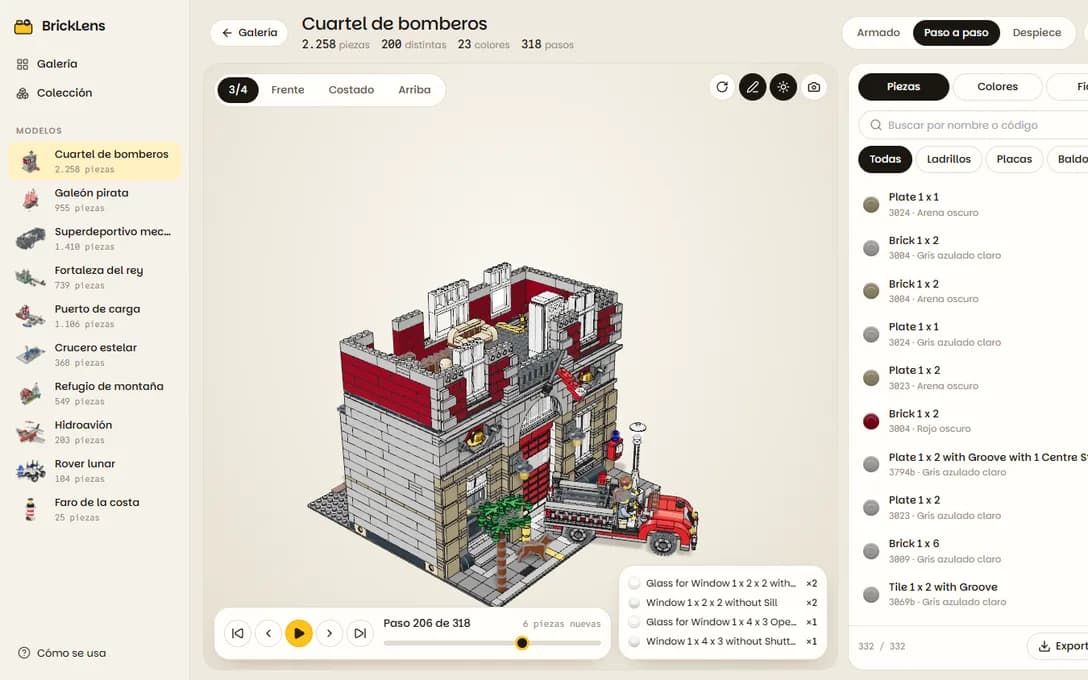
- Every build in 3D with its real parts: the official LDraw library geometry, part by part, rotatable in the browser
- The instruction steps: each step's parts drop into place and a callout says what went in and how many
- An exploded view that pulls every part away from the center to show what the build hides, from a car's chassis to a building's interior
- A parts list wired to the model: tap a row and everything else fades so you see where those parts go; tap a part and its row is picked
- Filters by category and color, search by name or part number, and the list exported for a replacement parts order
- Dimensions in studs and inches, the palette in proportion and author credit for every file
- The whole collection added up: which parts repeat across models and which colors dominate