Our work
Construction
BidWorks
Buying and subcontracting a job: bids, purchase orders, subcontracts and the tool crib
The demo is a recreation of the system, with made-up data: the original belongs to the client and is not published. No sign-up needed.
The context
A job's budget is put together once and then spent over a year, purchase by purchase. Every trade gets quoted by three suppliers, one is picked, a purchase order goes out, and then somebody has to check that what showed up is what was ordered and that what was paid fits inside the budget. When that lives in email and a notebook, the overrun isn't found while you're buying: it's found closing out the job, which is when there's nothing left to do about it.
What the system does
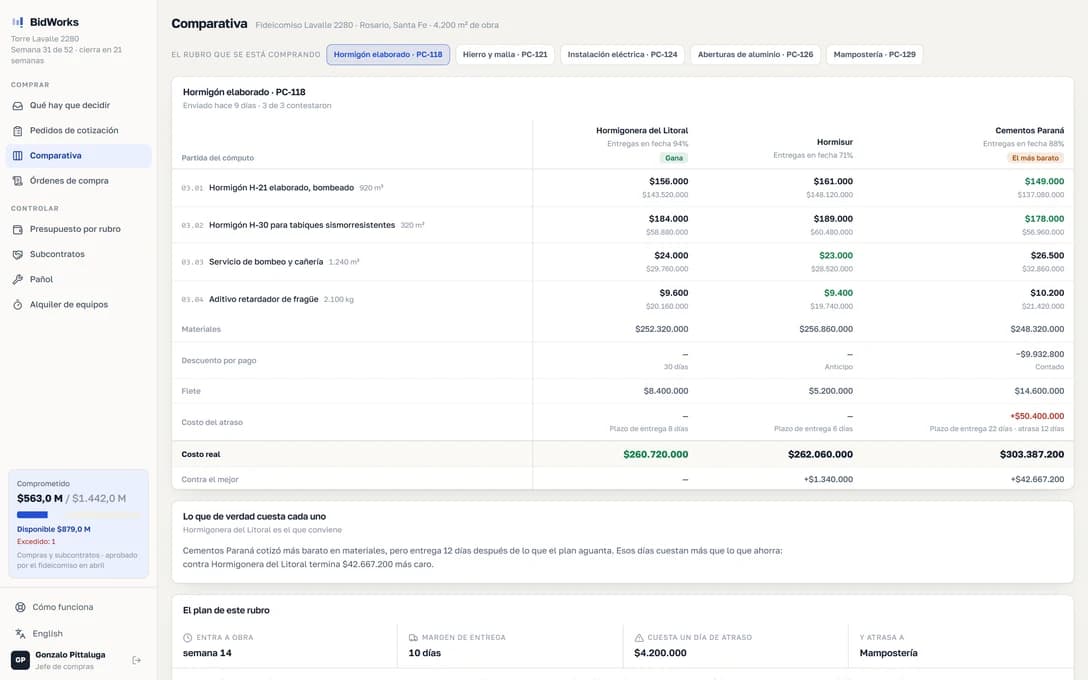
- The bid comparison is the main screen: three quotes off the same takeoff, one next to the other, and the real difference once freight and lead time are added in
- The cheapest doesn't always win and the system says so with numbers: a supplier who delivers two weeks later can cost more than the price difference if it delays the trade that follows
- Every purchase order draws down its trade's budget, so the overrun shows while you're buying and not at closeout. It's the only way it's any use for deciding
- Subcontracts carry their progress billing and their retainage, which is where the money goes when it's kept by hand
- The tool crib records which tool went out, with whom and to which job. It isn't inventory: it's knowing who to ask about the grinder that never came back
- Equipment is tracked by hours and not by days: a rented backhoe that worked three hours and waited five costs the same and means something else
- And a bid package nobody answered flags itself. A supplier's silence is information, and in a spreadsheet it's an empty row nobody looks at