Cargaplena: fuel control for a fleet of 25 buses
A web system for a passenger transport company in Jujuy that replaces the fuel spreadsheet: every fill-up is uploaded with its receipt and per-vehicle totals are calculated automatically.
- Client
- Cargaplena
- Industry
- Passenger transport
- Market
- Argentina
- Service
- Custom software
Where they started
The company runs passenger transport in Jujuy, Argentina, with a fleet of 25 vehicles: 22 buses and 3 utility vans for deliveries. Each vehicle is identified by a fleet number, called an "interno".
Fuel is loaded in two places: at the company's own pump at the depot and at service stations. In both cases the process was the same and had two manual steps. The fuel ticket reached the office on paper, and someone copied the liters into an Excel file that accumulated the total per vehicle.
The day-to-day problem
With that process they could tell how many liters each vehicle had accumulated, but not much more. The receipt stayed on a piece of paper that had to be kept and found whenever a question came up, and every total depended on someone having copied each ticket correctly.
There was also no way to answer a basic question: if a vehicle had loaded a certain number of liters, was that a lot or a little? Liters alone do not say; you need to know how many kilometers were driven with them.
What we built
- Entry of each fuel record with vehicle, source (own pump or service station), liters, price per liter and receipt number.
- Photo of the receipt attached to each record, taken with a phone camera.
- Amount calculated automatically from liters and price.
- Odometer as a field of the same form, to calculate real consumption.
- Automatic totals per vehicle, replacing the spreadsheet.
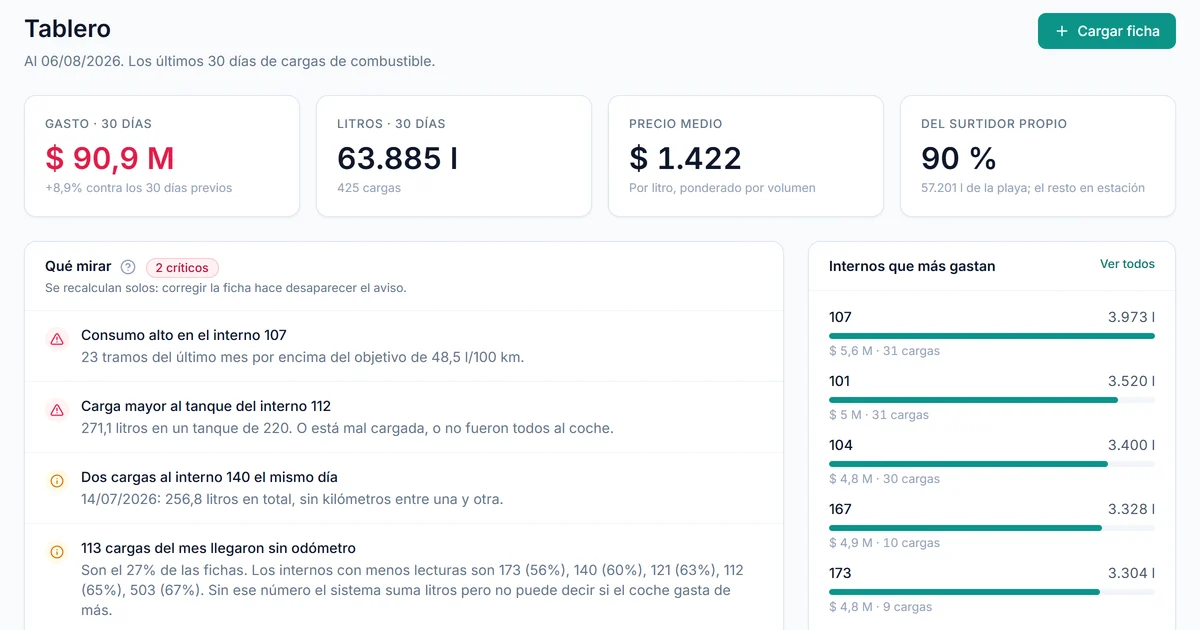
- Dashboard with the month's spending and what is worth reviewing.
- Loads: the ledger of every record, with the receipt and consumption next to it.
- Vehicles: liters, spending and consumption for each unit.
- Reports by month, by place of purchase and by type of service.
- Users and roles, with different access for administration and finance.
How it works
The system is a web application used from the office computer. When a ticket arrives, the office opens the load form, picks the vehicle, says where the fuel came from, fills in liters and price, and attaches the photo of the receipt. The amount is calculated automatically and the record is saved.
From those records, the system builds the rest. Each vehicle has its liters and spending accumulated without anyone adding them up, the dashboard shows monthly spending and the reports break it down by month, by where fuel is bought and by type of service.
When a record includes the odometer, the system can calculate the vehicle's real consumption in liters per 100 kilometers and compare it with what is expected for that type of vehicle. Roles separate what each person can see and do: the administrator and finance do not have the same access.
Decisions we made
The first was that the load screen had to be faster than paper. If entering a record takes longer than writing it down with a pen, the system is abandoned within weeks and no report can save it. So the form asks only for what is needed, calculates the amount by itself and lets the user take the receipt photo with a phone.
The second was to show the odometer from the start, even though it is not written down today. The spreadsheet accumulated liters, not kilometers, which tells you how much a vehicle spent but not whether that spending is reasonable. Having the field visible in the form means they can start recording it without redoing anything later.
The third was to measure consumption in liters per 100 kilometers, the usual unit in the industry, which goes up when something is wrong. The reference value is also set per vehicle: an urban bus does not consume the same per kilometer as a long-distance one, or as a delivery van. Comparing them against a single number would make the report flag as a problem something that is normal.
The fourth was to limit the scope. The system covers fuel only, with the screens Dashboard, Loads, New record, Vehicles, Reports and Users, and deliberately leaves other parts of the operation out so that the tool actually gets used.
Where it is today
The office loads each fuel ticket into the system instead of the spreadsheet. The next stage under discussion is tank reconciliation of the company's own pump: checking what goes in against what goes out.